

Unity vs Unreal for AR/VR (2026): Which Engine Should You Use?
Choosing between Unity and Unreal for augmented reality (AR) or virtual reality (VR) is less about “which engine is best” and more about which workflow your team can ship with.
Both engines produce high-quality AR/VR experiences and deploy across multiple platforms. Developers searching Unity vs Unreal for Virtual Reality VR or Unity vs Unreal for Augmented Reality AR are usually trying to answer one practical question: which engine will let me build, iterate, and ship faster with my current team and constraints?
If you are deciding for a team (or evaluating a vendor), these are the factors we consider:
Time-to-prototype
Time-to-polish
Integration complexity, and
Team skill alignment
Codebase maintainability
If you want a second set of eyes on your choice, we can scope your project and provide an estimate and timeline.
The Bottom Line Up Front: we usually choose Unity
For most of the enterprise AR/VR work we deliver, we almost consistently choose Unity.
That is not because Unreal cannot ship enterprise-grade XR. It is because Unity aligns with how we build and what our clients typically need:
We have the engineering skill set to move quickly in a code-first workflow and build custom systems without fighting the tool.
We prioritize integration compatibility (enterprise data sources, APIs, identity, and existing software ecosystems), and Unity has been consistently efficient for that kind of extensibility in our delivery.
We want a high degree of customizability in logic and behavior, especially for interaction-heavy training and workflow products.
If your team shares those constraints, Unity is often the pragmatic choice. If your top requirement is visual fidelity that looks premium fast and you want to lean heavily on visual scripting to get there, Unreal can be the better starting point.
Not a developer? You can still create AR content (no engine required) with Katana XR
If you are not a developer but you want to create and publish AR/XR content, you do not need to start with Unity or Unreal.
Katana XR lets you author and publish guided content using text and images for free:
Free on the web for authoring
Available free on Meta Quest so you can build and validate content in-headset
Designed for teams that need to ship hands-free training, guided workflows and how-tos without standing up a full engineering pipeline
If your goal is to create step-by-step content (rather than build a custom application), Katana can be the fastest path to a usable pilot.
TL;DR: a practical way to choose
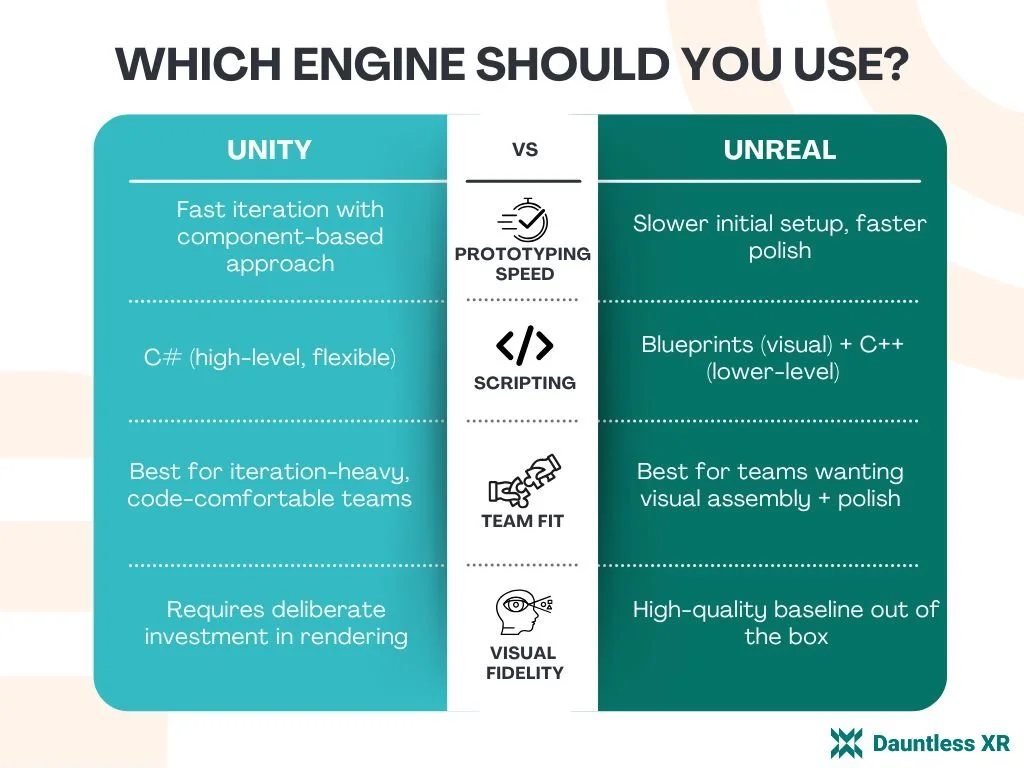
Choose Unity if you want rapid prototyping, highly customizable logic and behavior, and a workflow centered on component-based iteration in a high-level language (commonly C#).
Choose Unreal if you want to reach a refined, high-fidelity baseline quickly using visual scripting (Blueprints) and you are comfortable going deeper with lower-level code (commonly C++) when needed.
Either can work for enterprise AR/VR. The best choice is the one that empowers your engineers to iterate confidently and maintain the product over time.
Unity vs Unreal for AR/VR: quick comparison
The mental model: prototype speed vs polish speed

The Dauntless framework for selecting an engine: Unity often helps teams prototype something unique faster, while Unreal often helps teams make something look polished faster. That does not mean Unity cannot look excellent, or that Unreal cannot support deep customization. It means the “default path” in each engine tends to optimize for different parts of the build cycle.
When teams get stuck in engine debates, it is usually because they are arguing about outputs (graphics vs performance) instead of the inputs that drive delivery:
workflow
iteration loops
the skill profile of the people building the product.
Decision framework for AR/VR teams
1) Workflow and iteration style
If your AR/VR product is interaction-heavy (training steps, guided procedures, hand interactions, multiuser behaviors), your iteration loop matters more than almost anything else.
Unity tends to favor a component-based approach where you can prototype, adjust behaviors, and iterate quickly.
Unreal tends to favor getting to a “good baseline” quickly, especially when you lean on Blueprints and existing systems.
2) Team skills and the “empowered engineers” test
A reliable predictor of success is whether your engineers feel productive in the engine’s paradigm.
If your team is strongest in a high-level coding workflow and wants to move quickly through iteration, Unity often feels natural.
If your team prefers visual scripting for rapid assembly and is comfortable dropping into lower-level code for performance or custom systems, Unreal can be a strong fit.
If the team feels constrained or slowed down by the tool, the engine choice is wrong regardless of feature checklists for your product or game.
3) Visual fidelity vs effort
In AR/VR, visual quality is not just aesthetics; it can affect comfort, clarity, and perceived credibility.
Unreal often delivers better visual fidelity for less effort early on.
Unity can reach high quality visuals, but teams may need to invest more deliberately in rendering choices and polish.
If your success criteria includes “looks premium fast” (demos, stakeholder buy-in, marketing visuals), Unreal can reduce time-to-polish.
4) Uniqueness vs defaults (“AKA why do Unreal projects look the same?”)
A common question we hear is why Unreal projects can appear to “look the same.” A practical explanation is that Unreal makes it easy to assemble strong results quickly using default systems and preset behaviors. The tradeoff is that standing out can require more intentional customization once you move past the defaults.
To be fair, Unity projects also carry recognizable fingerprints. Experienced developers can often make an educated guess about the engine behind a project. The key point is not that one engine is “generic,” but that defaults accelerate delivery and uniqueness costs time.
5) Cross-platform deployment and hardware agnosticism
For AR/VR teams, cross-platform questions are usually asked as if there is a single winner. In practice:
Both Unity and Unreal can build to multiple platforms.
The real cost of multi-platform support is is in device constraints, performance budgets, QA, and platform-specific edge cases, not in your engine choice.
If your roadmap includes multiple headsets, PCVR, or mobile AR, plan your testing matrix early and budget time for platform-specific optimization.
6) Enterprise integrations and extensibility
If your AR/VR application must integrate with existing systems (identity, data sources, analytics, content repositories), extensibility becomes a first-class requirement.
Many teams find Unity slightly easier to work with for enterprise-style integrations and modular systems, but Unreal can absolutely support enterprise applications too. The practical difference is typically not “can it integrate,” but how your team prefers to structure and maintain the integration layer.
Where Godot and Omniverse fit
Godot is gaining traction largely because it is open source and reduces vendor lock-in risk. The tradeoff today is that you may need to be more hands-on and build tooling you would otherwise get out of the box.
NVIDIA Omniverse is best thought of as a pipeline and interchange platform (often centered on USD) rather than a replacement for a real-time engine. It can be valuable when you need a single source of truth for 3D scenes and collaborative workflows.
Practical build advice that prevents schedule surprises

Pick an engine version and stick to it for the duration of the project whenever possible.
Decouple engine-specific code from your data/integration logic so you can evolve systems without rewriting the entire application.
Set performance budgets early (especially for standalone VR) and validate them on target devices, not just in-editor.
Engine choice checklist (use this before you commit)
Target devices (Quest, PCVR, mobile AR, optical see-through)
Interaction complexity (hands, controllers, gaze, voice)
Performance budget and comfort constraints (frame rate targets, thermals)
Visual requirements (realism vs stylized, lighting constraints)
Content pipeline (3D sources, versioning, collaboration)
Integration needs (APIs, identity, data sources, analytics)
Team skills (C# vs C++ vs visual scripting)
Timeline risk (how often you expect to change requirements)
QA matrix (devices, OS versions, peripherals)
Deployment model (enterprise distribution, updates, device management)
If you want us to sanity-check your plan, you can book a call and we will return an estimate and timeline.
Developer resources
If you are building AR/VR for enterprise use cases (training, guided workflows, data visualization, digital twin-style experiences), Dauntless XR can support you with engineering and delivery.
Unity dev tools
If you are building in Unity, these tools can help accelerate common UI and content workflows:
Light Mode / Dark Mode UI (FREE): Helps you implement theme switching for in-app UI (light/dark) without rebuilding your entire UI system. Useful for enterprise XR apps where operators work in varied lighting conditions and you need consistent readability.
Image Sequencer (FREE): A utility for working with image sequences (frame-by-frame images) inside Unity’s tooling pipeline. Helpful for quickly generating or previewing animated UI elements, instructional overlays, or lightweight VFX without committing to a heavier video workflow.
XR Toaster Pop-up ($): A lightweight toast/notification system for XR UI. Useful for confirmations and status feedback (e.g., Saved , Step complete , Connection lost ) without interrupting the user’s task flow.
How we help teams ship
AR/VR engineering support: architecture, prototyping, production builds, performance optimization, and deployment planning
Integration support: connecting AR/VR apps to enterprise data sources and APIs
Hardware-agnostic delivery: planning for multi-device roadmaps and cross-platform constraints
Let’s build something together
If you want help choosing the right engine, scoping the build, and planning integrations, book a call with our team. We will review your requirements and provide a project estimate and timeline based on your target devices, feature scope, and deployment needs.
Common Developer Questions: Unity vs Unreal
-
Both can be beginner-friendly, but they teach different mental models. Unreal’s visual scripting can make it easier to assemble a working prototype quickly. Unity often rewards developers who want to learn a code-first workflow and iterate rapidly once they understand the component model.
-
It depends on what “better” means for your project. If you need high-fidelity visuals quickly, Unreal can be a strong choice. If you need rapid iteration on interaction logic and modular systems, Unity can be a strong choice.
-
Yes. Blueprints are commonly used to prototype and build VR interactions in Unreal, and teams can drop into C++ when they need deeper control or optimization.
-
Choose the current long-term support (LTS) version at the start of the project, then avoid upgrading mid-project unless you have a specific stability or security reason. Mid-project engine upgrades can introduce avoidable risk.
-
Usually yes for raw assets (models, textures, audio), and no for engine-specific packages (Blueprint systems, Unity packages/plugins). Expect rework when moving behaviors, tooling, or engine-native systems.
-
A common reason is that Unreal’s Blueprint system makes it easy to assemble strong results quickly using preset behaviors and defaults. That accelerates “good-looking fast,” but uniqueness often requires extra customization effort beyond the defaults.
-
Godot is a notable alternative gaining traction, especially after licensing concerns around proprietary engines. It is open source and improving quickly, with growing community and corporate support (including SDK support), but can be more hands-on than Unity/Unreal.
-
Unity and Unreal can produce similar end results, but they optimize for different workflows. Unity is commonly component-based and supports rapid prototyping and customization while working in a high-level language (often C#). Unreal often gets teams to a refined baseline quickly using visual scripting (Blueprints), with C++ available for deeper control.
-
Unity can have a slight edge for enterprise builds that require modularity and frequent integrations with existing systems and data sources (especially in .NET-adjacent environments). Unreal is also used successfully in enterprise contexts. In practice, the best choice is the one that keeps your engineers productive and your integration layer maintainable.
